Change data capture for MySQL
MySQL to BigQuery, in real time.
Copy your tables once, then stream every insert, update and delete into BigQuery within seconds. Exact copies, full change history, and no pipelines to maintain.
Free during early access · No credit card · About 15 minutes to set up
MySQL · binlog
BigQuery · analytics.orders
- 1042new54.90
- 1041shipped120.00
- 1040delivered18.00
In sync0 changes applied
Works with MySQL wherever it runs
How it works
Live in three steps
Guided setup for every major MySQL host. No MySQL or BigQuery expertise needed: we tell you exactly what to click.
- Step 1
Connect MySQL
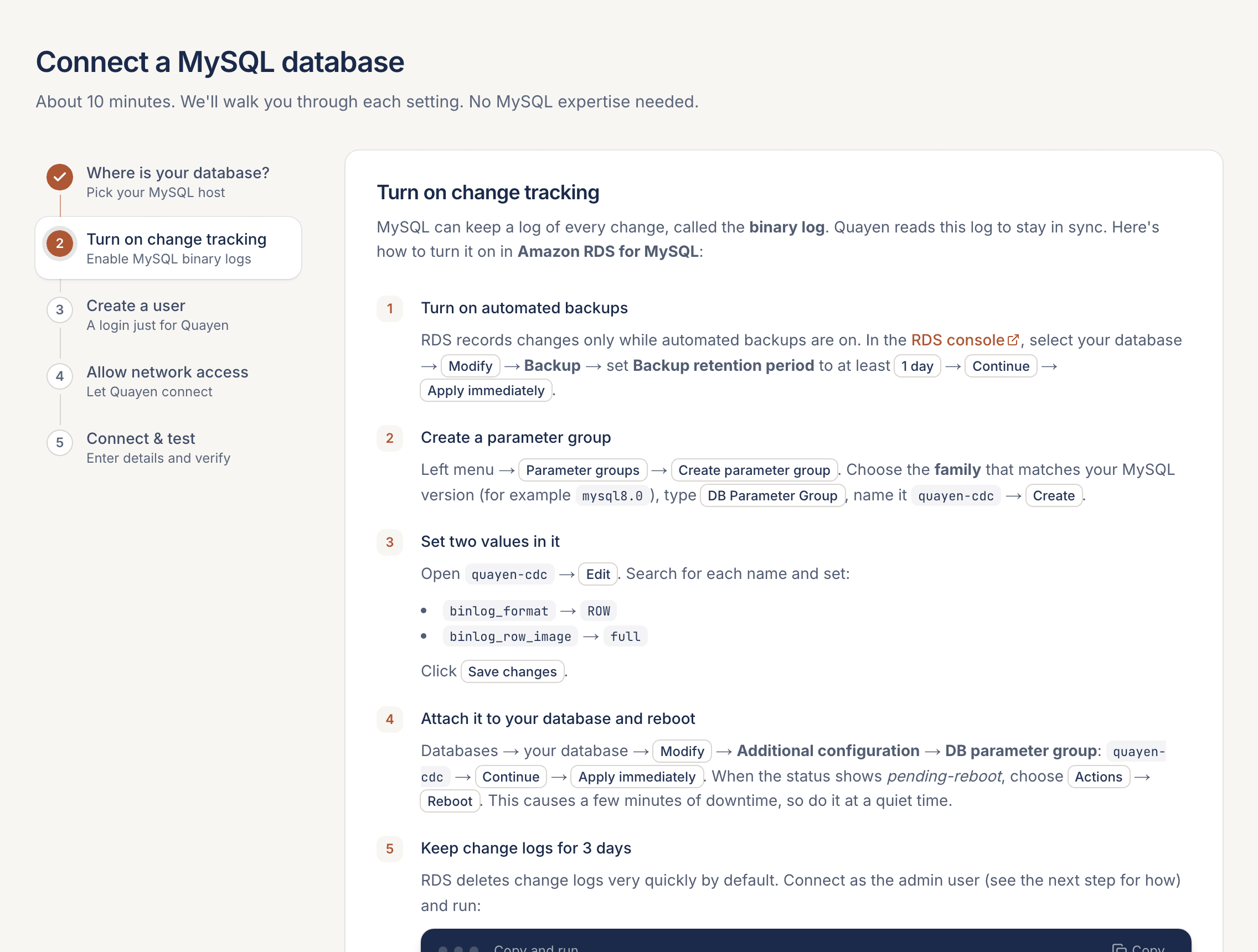
Pick your host (RDS, Aurora, Cloud SQL, Azure or self-hosted) and follow the exact clicks to turn on the binary log and create a read-only user.
- Step 2
Connect BigQuery
Create a service account with two roles and upload its key. We check every permission before you save.
- Step 3
Choose tables, start
Existing rows are copied from a consistent snapshot, then every insert, update and delete streams in within seconds.
Exact clicks for your MySQL host
Pick RDS, Aurora, Cloud SQL, Azure or self-hosted and follow the steps. The connection test explains any problem in plain English.
Built for production
Everything analytics needs from your database
Not just new rows. Every change, applied correctly, with the tools to fix things when the unexpected happens.
Exact copies, deletes included
Updates and deletes are applied in commit order, so each BigQuery table matches MySQL row for row, not an append-only log.
Schema changes handled
New MySQL columns appear in BigQuery automatically.
Full change history
Every change kept in its own dataset, with operation, order and time.
Partitioning, any time
Set it up front or change it later. The table is rebuilt in place, without re-reading MySQL.
Re-copy one table
Rebuild a single table while the others keep streaming.
Freshness you can see
Per-table timers show the last change in MySQL, when it landed in BigQuery, and when the copy was last refreshed, live to the second.
Lower BigQuery bills
Designed around how BigQuery charges
Your data stays in your own Google Cloud project, so BigQuery bills you directly. We engineered the write path to keep that bill small.
- Batches with only inserts skip the full-table scan BigQuery bills for updates and deletes.
- Change history is clustered by sequence, so each refresh reads only the new changes.
- History is stored with compressed (physical) billing and expires on the schedule you pick.
- You choose how often tables refresh, from every minute to every hour.
Example: a 10 GiB table that only receives inserts, refreshed every 5 minutes
8,640 refreshes a month · BigQuery on-demand at $6.25 per TiB
Billed for the whole table every time
Billed for the new rows (10 MB minimum per table)
Read-only by design
A dedicated MySQL user with SELECT and replication rights only. We never write to your database.
Encrypted secrets
Passwords and service-account keys are encrypted at rest with AES-256-GCM, and connections use TLS when available.
Isolated by organization
Every query is scoped to your organization, with admin and member roles for your team.
FAQ
Questions, answered
How much does Quayen cost right now?+
Free during early access: every feature, no credit card. Fair use up to 3 pipelines and 100M changed rows a month per organization. The prices below apply after early access. We'll email you at least 14 days before it ends, and nothing is ever charged automatically: you choose a plan if you want to continue. BigQuery storage and queries are billed separately by Google to your own project.
How does MySQL to BigQuery change data capture work?+
Quayen first copies the tables you choose from a consistent snapshot. It then reads MySQL's binary log (binlog), which records every insert, update and delete, and writes each change to a change-history table in BigQuery within seconds. On a schedule you choose (every minute to every hour), it applies those changes to an up-to-date copy of each table, so the copy always matches MySQL, including deletes.
Does it put load on my production database?+
Very little. After the initial copy, it only reads the binary log, the same mechanism MySQL replicas use. It never writes to your database and uses a read-only user with replication permissions.
Which MySQL hosts are supported?+
Amazon RDS for MySQL, Amazon Aurora MySQL, Google Cloud SQL for MySQL, Azure Database for MySQL Flexible Server, and self-hosted MySQL 8. The setup guide shows the exact settings for each.
Who pays for BigQuery?+
Your data lands in your own Google Cloud project, so BigQuery storage and query costs are billed by Google to you, separately from Quayen. Quayen is designed to keep those costs low: batches that only contain inserts skip the full-table scan BigQuery would otherwise bill for, change history is clustered so refreshes read only new changes, and old history expires automatically.
Can I connect a MySQL database on a private network?+
Yes. Connect through an SSH bastion in the same network: Quayen gives you a public key to add to the bastion, and every connection, including the binary log stream, goes through it. The bastion's host key is pinned on first connection.
Will I know if a pipeline stops?+
Yes. If a pipeline can't keep up for 10 minutes, your organization's admins get an email with the error and a link to the pipeline, and another when it's running again. Quayen keeps retrying automatically in the meantime.
What happens when I add a column in MySQL?+
New columns are added to the BigQuery tables automatically and start filling in from the next change. Existing data is not rewritten.
Can I re-copy a single table without affecting the others?+
Yes. Re-copying a table reads it from MySQL again and rebuilds its BigQuery copy while every other table keeps streaming. Changes made during the re-copy are kept.
How long is the change history kept?+
You choose: 3, 7, 14, 30, 90 or 365 days, or forever. It is stored in its own BigQuery dataset so it doesn't clutter your analytics dataset. If changes ever wait longer than the retention allows, the affected table is re-copied automatically so data is never silently lost.
How are my credentials stored?+
Database passwords and Google Cloud service-account keys are encrypted at rest with AES-256-GCM. You can revoke access at any time by deleting the MySQL user or the service-account key.
Your MySQL data in BigQuery today
Free during early access. Set it up yourself in about 15 minutes, or we'll do it with you on a call.